


The Challenge
Large-scale rebranding projects involve hundreds of repetitive asset updates that are tedious to do manually and easy to get wrong at volume. And restructuring complex onboarding flows requires holding a lot of product-specific logic in mind while working through every user path.
Our design team wanted to understand, in practical terms, where AI tooling could absorb some of that pressure and where it would introduce more problems than it solved.
Three workflows became our testing ground: UX competitive analysis, large-scale asset rebranding, and onboarding flow redesign. Each one tested a different category of design task, and each one taught us something different.
What we found: AI is a 10x multiplier for production and data synthesis, but a liability for high-stakes business logic without human guardrails
Utilizing AI for competitor research transformed the process from a 'hunting' exercise into a 'synthesis' exercise. Traditional research requires roughly 80% of the time to be spent on data gathering and only 20% on analysis. AI flipped that ratio, allowing for near-instant ingestion of data points and more time spent on what actually matters.— Lidiya Boichuk, Senior Designer, Softjourn
The Solution
Experiment 1: UX Research and Competitor Analysis
The task was a standard competitive analysis: reviewing a set of competitor products against Nielsen Group UX standards (a widely used industry framework for evaluating the quality of a user experience) and producing a comparison ready to go into a client presentation.
Normally, this kind of research means spending several hours moving between sources, pulling data manually, cross-referencing standards documentation, and then formatting everything into something presentable. Most of that time is not design thinking. It is information gathering and formatting, the kind of work that is necessary but not where a senior designer adds the most value.
Using Claude and Gemini, we approached the task differently. Rather than searching manually, we built detailed prompts that directed the AI to gather relevant standards data, review competitor products against those criteria, and format the findings into comparison tables ready for a presentation deck.
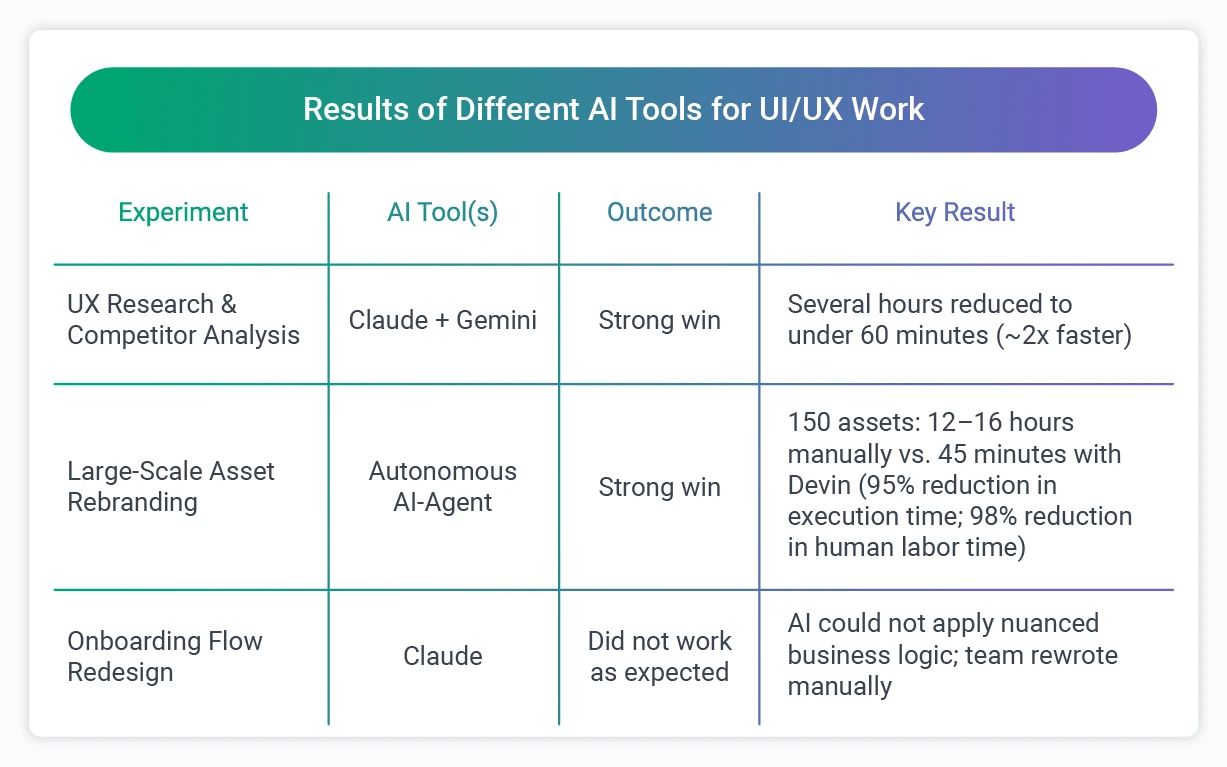
The result: research that would typically take several hours was completed in under 60 minutes, roughly a 2x improvement in time. The output required review and refinement, as all AI-generated work does, but it arrived in a format that was already structured and presentation-ready rather than raw notes requiring a separate formatting pass.
What shifted was not just speed but the nature of the work itself. Traditionally, competitor research is roughly 80% data gathering, screenshots, feature lists, mood boards, and only 20% actual analysis. AI flipped that ratio. With near-instant ingestion of reference material, our designer could spend the majority of her time on the part that actually requires design expertise.
One of the more unexpected findings: the AI did not just surface feature gaps. It identified patterns in how competitors used industry-specific terminology in their navigation, a layer of insight that informed a broader rethinking of the information architecture. That kind of synthesis would have been easy to miss in a manual research pass focused on capturing rather than interpreting.
Experiment 2: Large-Scale Asset Rebranding
This experiment came directly from a real project requirement. A client needed approximately 150 themed assets, logos, banners, and UI elements, replaced across a complex codebase, all resized and reformatted to fit updated brand specifications across various UI environments.
Done manually, this is a significant undertaking. A mid-level designer or developer would need to audit, export, rename, and replace each asset individually, verifying CSS integrity throughout. The estimated manual effort would be 12 to 16 hours.
We deployed an autonomous AI development agent (a tool that can be given a task and carry it out across a system with minimal step-by-step instruction), to handle the replacement process. It autonomously wrote the replacement scripts, executed the swaps, and performed self-correction when it encountered pathing errors along the way. Human involvement shifted to approximately 15 minutes of strategic prompting and final review.
That works out to a 95% reduction in total execution time, and a 98% reduction in human labor time. Human involvement shifted from owning every step of the process to 15 minutes of strategic prompting and final review. The bulk of the mechanical work was handled by the agent.
One important note worth being direct about: the autonomous AI development agent can introduce unintended changes in other parts of a codebase as it works. A thorough final review pass is not optional. This is part of why the human-validated principle applies here as much as anywhere else. The agent's speed is only an advantage if the output is verified before it goes anywhere near production.

Experiment 3: Onboarding Flow Redesign (Where AI Fell Short)
Not every experiment delivered a clean win. This one is worth documenting with the same care.
The task was to take a 10-step onboarding flow for a client product and restructure it into segmented tabs organized by user type, with different mandatory and optional steps for each group.
We used Claude, and we put genuine effort into the prompting. The business logic was described in detail. The constraints around which steps were required for which user types were spelled out explicitly.
Claude produced a restructured flow, but it could not correctly apply the product-specific rules. It grouped steps logically based on general structure without understanding which ones carried actual business consequences for a specific user type.
The distinction between mandatory and optional steps across different user groups is not something that can be inferred from a general description. It requires genuine knowledge of how the product works, knowledge that lives in the team, not in a prompt.
The result: the team manually rewrote and divided the flow.
This is the category of AI failure worth naming clearly. The output looked plausible. It was structured, it addressed the prompt, and it would pass a quick visual scan. The problems were in the details, which is exactly where a flawed onboarding flow causes real user friction.
For example, the AI placed a step that was mandatory for one user group into the optional category, an error that looked completely reasonable on the surface but would have caused real problems for affected users if it had gone unreviewed.
The takeaway is not that AI cannot contribute to flow design, as used as a structural scaffold or a sounding board at an early stage, it can still save time. But complex logic restructuring, where the sequencing of steps carries direct business consequences, needs to stay in human hands. The AI can help frame the problem, but it should not own the answer.
The deeper issue here was not capability but context. The AI had no access to the institutional knowledge that makes this product's onboarding logic work the way it does. Which steps carry mandatory weight for certain user types, which fields are optional for some but required for others, and why certain steps exist at all.
That knowledge lives in our team, accumulated through months of working with the product, and no prompt can fully substitute for it.
Claude as a Day-to-Day Design Tool
Beyond the three structured experiments, our design team has built Claude into regular project work in ways that are harder to measure but equally noticeable in practice.
The most consistent use is as a starting point. Rather than opening Figma to a blank canvas, designers use Claude to generate initial UX drafts, propose UI improvements, and sketch out early ideas that can be brought directly into the design tool for refinement. The blank canvas problem, that first hour of a project spent building base grids and standard flows from scratch, has largely been eliminated.
Claude is also useful for quick client proposals. When a project needs a fast, credible first pass on a flow or layout direction, generating an AI-assisted draft gives the team something concrete to react to and refine rather than starting from zero.
One specific application: fed with detailed user personas and brand guidelines, Claude can generate UX logic and feature sets significantly faster than manual sketching of user flows and logic trees. It can also produce functional React or HTML components to test a flow interaction before a single pixel is committed in Figma, which means the team can pressure-test a user experience much earlier in the process.
Fed with detailed user personas, Claude accelerates the transition from persona to feature set by approximately 70%, cutting out much of the manual logic-sketching work that typically sits between research and design.
The pattern across all of these uses is the same one that showed up in the research experiment: Claude handles the setup work, and the designer handles the judgment.
Summary of Results
The Benefits
The Human-Validated Principle
One rule held constant across all three experiments: AI output is a draft, not a deliverable.
Our team works under a strict 'AI-powered, but human-validated' philosophy. In practice, that means three non-negotiable rules apply every time AI tools enter our design workflow:
- Expert Oversight: AI output is treated purely as a draft. Our designers manually review every logic flow and edge case to confirm that business constraints are correctly applied before anything is used.
- Data Privacy: We strictly prohibit feeding real client data or personally identifiable information (PII) into AI models. Client content stays with the client.
- Security: We proactively disable AI data-sharing and learning settings in tools like Figma and Adobe to ensure that proprietary flows and visual assets remain private and are not used to train external models.
In practice, this means the efficiency gains we see from AI are real, but they are realized through collaboration between the tool and the designer. The goal is not to remove the designer from the process. It is to redirect their attention toward judgment, strategy, and validation rather than information gathering and repetitive production work.

What We Learned
Running these experiments with some discipline meant documenting not just the wins, but the conditions that separate useful AI assistance from risky reliance on it. These lessons came through consistently.
Context is the deciding factor: The quality of AI output reflects the quality of context it receives. In the research experiment, detailed prompts about standards frameworks and competitor criteria produced structured, usable outputs. In the onboarding experiment, even detailed prompts could not substitute for institutional knowledge about why specific steps exist and what they mean for different user types. Deep user personas and rigid brand guidelines are the difference between generic output and something usable.
AI gets you to 80%. The final 20% is still yours: Across both successful experiments, AI delivered strong first drafts and removed the setup work. What remained was the part that actually requires design expertise: the refinement, the brand alignment, the pixel-perfect polish, and the judgment calls that turn a good output into a great one. That final 20% is not a gap in the technology. It is where the designer's value is most clearly expressed.
Prompting is now a design skill: The ability to structure a clear, context-rich prompt has become as important in modern design workflows as proficiency in Figma or the Pen tool. Getting useful output from an AI tool requires the same discipline as writing a solid creative brief: knowing what you want, specifying the constraints, and anticipating where ambiguity will produce wrong answers. Teams that develop this skill get significantly more from the tools they already have.
Speed on the wrong task is not efficiency: The onboarding experiment moved quickly to an output that looked right but was not. That is a risk worth naming directly, particularly in design work where a flawed user flow has real downstream effects. Pattern-driven tasks benefit most from AI. Open-ended or highly context-dependent work requires more human involvement throughout, not just at the end.
"My day-to-day role has evolved from being the 'Creator of Everything' to the 'Editor-in-Chief.' Instead of spending the first hours of a project building base grids or standard flows, I now start with AI-generated variations and immediately move into high-value refinement, brand alignment, and emotional resonance." - Lidiya Boichuk, Senior Designer, Softjourn
Where This Applies
The workflows we tested here appear in some form across most software product categories. A few of the more direct parallels:
- Competitive UX research: Standard practice in fintech product development, ticketing platform design, and SaaS UI work. If your design team spends hours manually pulling and formatting competitor comparisons before every product decision, the research workflow we tested is directly applicable.
- Large-scale asset rebranding: A recurring challenge for any platform that has grown over several years. Marketplaces, ticketing systems, and financial services platforms often carry hundreds of UI assets that need consistent updating when brand guidelines change. The volume and repetition make this a strong fit for autonomous agent tooling.
- Onboarding and flow design: Even in the experiment that did not go as planned, AI contributed something useful at the structural scaffolding stage. The limit was specific: AI cannot reliably own the logic when business rules are complex and consequential. Where the flow is relatively standard, or where AI is being used to generate options for a designer to evaluate rather than produce a finished spec, the picture is more favorable.
Conclusion
These experiments did not confirm that AI tools are ready to run a design practice. Instead, they confirmed something more useful: which specific tasks benefit meaningfully from AI assistance, which carry too much product-specific complexity for AI to own reliably, and what practices need to be in place for AI-assisted outputs to be trustworthy.
For our design team, that knowledge is now part of how we work. And for clients who need UX research, competitive analysis, or large-scale UI updates delivered faster without trading off quality, it is something we can bring into an engagement with confidence.
Contact Softjourn to talk through what AI-augmented design work could look like for your project.