


How This Project Started
QA automation has a barrier that does not get talked about enough: a lot of the engineers who need it most are not automation engineers.
Manual QA specialists often carry the bulk of testing responsibilities on lean teams, and traditional coded automation requires a skillset and a hiring budget that many projects simply do not have.
That gap is exactly what low-code automation tools are supposed to address. But "supposed to" and "actually does" are worth testing rigorously.
Over the course of several weeks, two of our QA engineers ran proofs of concept using BrowserStack Low-Code Automation on two separate active client engagements.
The goal was to find out whether the tool could meaningfully help manual QA teams cover more ground, and to be honest about where it fell short. What follows is the full picture.
"The real game-changer is who does the work. With low-code automation, manual QA teams can take the reins themselves, building automation into their daily routine instead of passing it off to another department." – Viktoriia Lesyk, Senior QA Engineer, Softjourn
The Challenge
Both projects shared a similar starting point: manual QA capacity, limited time for test coverage, and a previous tool, TestRigor, that was showing its limitations.
TestRigor handled basic UI interactions reasonably well, but the team kept running into the same problems. False positives in text validation meant time was spent debugging issues that were not real, complex validations were unreliable, and generating dynamic test data across repeated test runs created more friction than it was worth.
On one project, serving a client in the entertainment technology space, the specific breaking point was file uploads. TestRigor consistently failed on scenarios involving file uploads through the local File Explorer, which were a routine part of the product's organizer workflows. Those flows were too important to leave without coverage, and manual workarounds were not sustainable.
On the other project, built around a project management platform, the issue was scope. Critical sanity checks and simple end-to-end flows needed regular automation, but the team was made up of manual QA specialists, and any automation solution had to be something they could pick up and run with independently. Getting any automation in place at all required a tool accessible enough for a manual QA engineer to pick up and run with.
The question across both engagements was the same: could a low-code approach close the gap without requiring the team to become automation specialists?
The real game-changer is who does the work. With low-code automation, manual QA teams can take the reins themselves, building automation into their daily routine instead of passing it off to another department.— Viktoriia Lesyk, Senior QA Engineer, Softjourn
The Solution
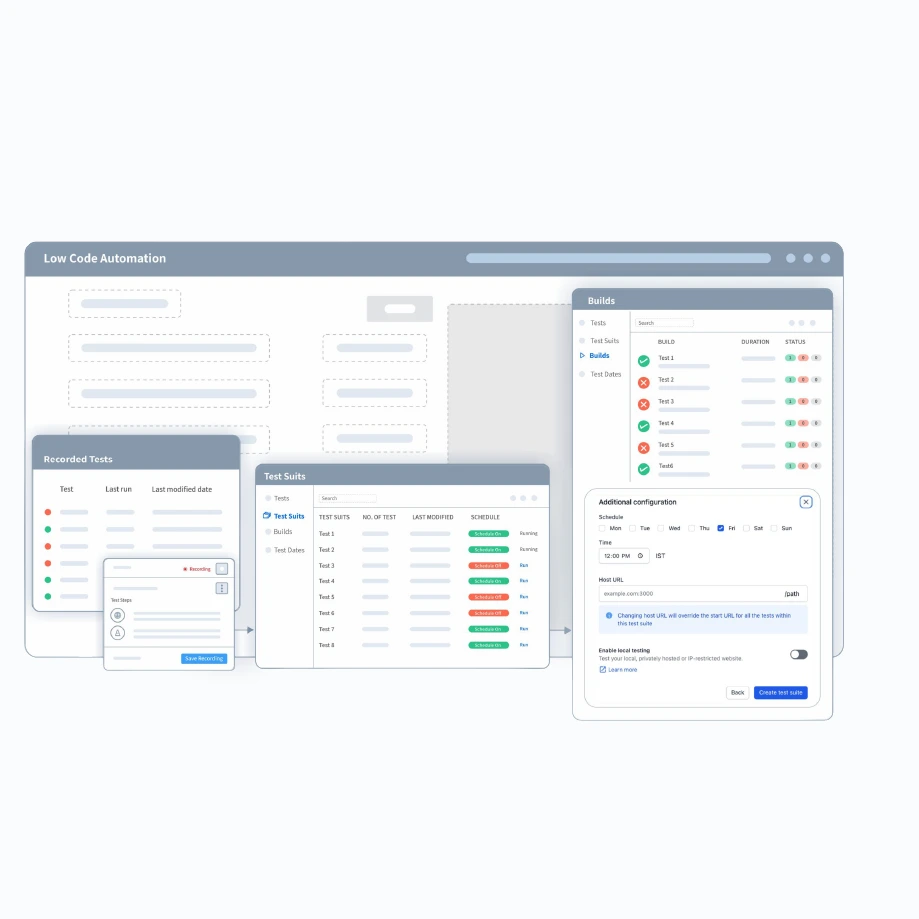
BrowserStack Low-Code Automation works by recording a QA engineer's actions in the browser and converting them into a structured, editable test script. Those scripts can then be debugged locally or executed in the cloud, with validation steps added using built-in checks, xPath, JavaScript, and variables for more complex logic.
"Low-Code Automation saves the time the QA team would otherwise spend on initial build checks, and manual QA engineers can use it to automate their regular, repeatable tests without writing a line of code." – Ilona Sheveliova, QA Manager, Softjourn
For manual QA engineers, the appeal is practical: no code required to get started, but enough flexibility to handle nuanced scenarios when needed. The BrowserStack agent handles element-finding and page scrolling automatically, which removes a common source of test fragility in coded frameworks.
Our team ran the PoC on both projects for approximately a month each, building out test suites, documenting what worked, and tracking where the approach showed strain.

Use Case One: Entertainment Platform
On this engagement, BrowserStack resolved the specific failure mode that had blocked automation previously. Key results from the build:
- File uploads through the local File Explorer worked correctly during cloud test runs, enabling organizer event-creation flows to be automated for the first time
- Automatic page scrolling handled element location reliably, removing a recurring source of test fragility
- Customer purchase flows and organizer event-creation scenarios both came together without manual scripting
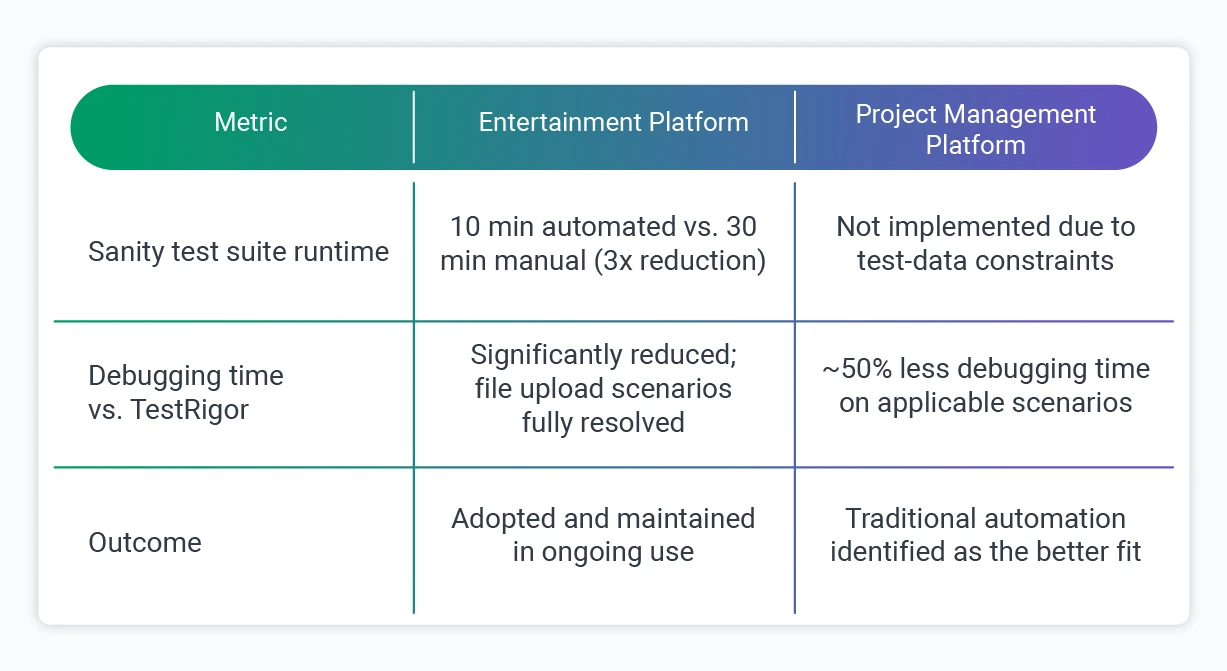
- The full sanity test suite, roughly 8 to 10 tests, was built and stabilized in approximately 20 hours and held up consistently in regular use
"BrowserStack Low-Code Automation works more reliably with file attachments and page scrolling, and for our sanity checklist scope, that made all the difference. It saves the time the QA team would otherwise spend on initial app build checks, since a portion of those are now automated." – Ilona Sheveliova, Quality Assurance Manager, Softjourn
Use Case Two: Project Management Platform
On this engagement, the tool performed well in isolation on several fronts:
- Navigation capture was accurate, and form-population logic was solid, reducing debugging time on those steps by around 50% compared to TestRigor
- Text validation was more reliable, removing the false-positive issues the team had been managing previously
- The approach was accessible to the manual QA team from day one, with no prior automation background required.
But a structural problem emerged that had nothing to do with BrowserStack itself: creating and configuring the test data required for each test was consuming between 50% and 85% of all test steps.
That volume of in-test setup made the overall approach inefficient in a way no tooling choice could fix. After evaluating the findings, the team made the call not to implement BrowserStack Low-Code Automation on this project, identifying traditional automation with proper data management as the better fit.
That decision, and the reasoning behind it, is one of the most practically useful findings to come out of this work.
"While TestRigor required hours of debugging and only worked for specific cases, LCA made the process seamless. By simply uploading a file during the steps recording, the tool handles the rest automatically, no extra configuration or troubleshooting required." – Viktoriia Lesyk, Senior QA Engineer, Softjourn
The Results
The outcomes across the two projects tell a paired story:
On the entertainment platform, the shift was immediate and measurable. Sanity checks that previously required a dedicated manual run every time became automated and repeatable. Build validation got faster, which meant the team could move to deeper regression work sooner.
With routine checks now running automatically, the QA team also freed up meaningful time to shift focus toward new feature testing rather than spending each build cycle on baseline functionality checks.
On the project management platform, the individual tool metrics were positive in isolation. The 50% reduction in debugging time was real, and text validation improvements were real.
But when test-data preparation consumed the majority of every test's steps, those gains could not offset the overhead. The team recognized the pattern early and documented it thoroughly rather than working around it.
The contrast between the two projects comes down to one distinction: the tool worked well where the project structure suited it, and on the project management engagement, the team recognised that early and made the disciplined call to step back.
"Ultimately, we decided against implementing Low-Code Automation for the project. The reason was test data management. Creating and configuring data for each test accounted for 50% to 85% of all test steps. In scenarios with such heavy requirements, traditional automation remains the superior choice." – Viktoriia Lesyk, Senior QA Engineer, Softjourn
What We Learned
Running this PoC across two real engagements with genuinely different outcomes gave us a clearer picture of where low-code automation earns its place. A few things became clear.
- Match the tool to the project structure, not just the team: Low-code automation is a strong fit when test scenarios are relatively self-contained: flows that do not require extensive data scaffolding to execute. When test-data preparation dominates the test steps, as it did on the project management engagement, traditional automation with proper data management tooling is the more efficient choice.
- The access problem is real, and low-code tools address it: Manual QA engineers can build and maintain meaningful automation coverage without prior scripting experience. On the entertainment platform, tests that previously required manual execution every time became automated and reusable within a reasonable ramp-up period. The barrier genuinely came down.
- Low-code automation is not a full replacement for traditional automation engineering: It is well-suited for smoke tests, sanity checks, and core business flows. API testing, native mobile apps, advanced regression coverage, and complex data-driven scenarios still require traditional automation engineering. Teams that go in expecting a complete replacement will run into its limits quickly.
- The strategic approach still applies: As one of our QA engineers observed, the strategy for low-code automation should mirror classical automation: focus on smoke tests, core functionality, and regression suites. The tooling is different; the thinking behind it is the same.
Where This Approach Makes Sense
Based on what we observed across both projects, low-code QA automation is worth serious consideration in a few specific scenarios.
Teams Staffed Primarily With Manual QA Engineers
If the team has strong testing knowledge but not an automation coding background, low-code tools reduce the dependency on a dedicated automation specialist for core flow coverage.
Projects With Well-Defined, Stable Core Flows
Purchase paths, registration flows, login and navigation, file-based interactions: scenarios that run repeatedly and do not require heavy data scaffolding are good candidates.
Faster Build Validation Cycles
On the entertainment platform, sanity checks that once required dedicated manual time now run automatically. Teams get faster feedback on whether a build is stable, which frees up time for deeper testing work.
Projects With Limited Testing Budgets
Setting up and maintaining a basic low-code test suite is within reach for a manual QA engineer, which means teams that cannot justify a dedicated automation hire can still get meaningful coverage on their most critical flows.
Conclusion
What started as a practical question on two active client engagements became a sharper framework for thinking about low-code QA automation.
The tool performed well where the project structure suited it, and the team made the disciplined call to step back where it did not. We continue to build on these findings across our QA practice.
Whether you are evaluating low-code tooling, building out a broader QA strategy, or looking for experienced QA and automation engineering support on an active project, we are glad to share what we have learned and help you find the right approach. Contact Softjourn to start the conversation.