


How This Project Started
Our R&D work at Softjourn tends to start with a question one of our engineers runs into on an active project. When someone finds a smarter approach, the goal is to understand it well enough to bring it back to the team, not just use it once and move on.
While supporting a long-running engagement with an AI-driven automation and enterprise software company, one of our senior software engineers started asking a more fundamental question about his own daily work: what happens when you stop using AI as a faster search engine and actually rebuild how you develop software around it?
With the client's knowledge and support, he restructured his development workflow around AI tools on that live project over several months, not as a side experiment but as a real, production approach to real client deliverables.
-919x919.webp?v=1780088717752)
It's like talking to a smart person who gives you a perspective from the outside. You can agree or disagree, but you get that outside view quickly.— Orest Guziy, Senior Full-Stack Developer, Softjourn
The Challenge
The client's platform was a complex Python microservices system, and like most platforms of that kind, it came with a specific tax on developer time.
Writing unit tests for data comparison and export validation is tedious, repetitive work. When something breaks across multiple services, tracking down the root cause means digging through documentation, forums, and library code, sometimes for hours.
Additionally, keeping dependencies up to date across a large number of services means manually cross-referencing changelogs and adjusting code throughout the codebase.
This kind of work doesn't take an expert, but it is time consuming, and takes away from other, more important tasks for senior engineers.
The question our engineer set out to answer was whether AI could absorb that overhead without creating new problems in the process.
The Solution
Rather than deploying AI as an autonomous agent running in the background, our engineer took a deliberately supervised approach. Claude Code lives permanently inside the IDE (the application where developers write and manage code, such as VS Code), connected directly to whatever files are being worked on at any given moment. It does not execute actions independently, commit code, or trigger automated workflows. It waits to be asked.
The interaction style is intentionally conversational. Instead of structured, formalized prompts, the problem gets described in plain language, the same way you would explain it to a colleague who is smart but new to the project. If the first response misses the mark, the conversation continues. If it goes completely off track, the session restarts fresh.
Different task types get handled differently:
- Test and assertion generation: A problem description, the input file, and the expected output structure go in. Claude Code generates the comparison logic and test skeleton, which then gets manually reviewed and refined before it goes anywhere near the codebase.
- Debugging: Symptoms and method names go in; candidate root causes come out. The engineer filters those ideas against their own project knowledge, pushes back on the implausible ones, and follows the thread that holds up.
- Architecture consultation: When designing how data should be structured and stored, the read/write patterns get described and high-level guidance comes back. The AI returns structural options; the engineer evaluates which ones actually fit the system.
- Batch dependency updates: Claude Code reads the dependency tree across multiple Python services and generates the commands and code changes needed to update libraries in bulk, a task that would otherwise mean hours of manual cross-referencing.
At every stage, AI output is treated the same way a pull request from a human colleague would be: reviewed carefully, refined where needed, and rejected outright when the solution is overcomplicated or simply wrong.
The Benefits
The productivity gains across specific task types have been meaningful. The table below reflects estimated efficiency gains based on the engineer's professional experience comparing manual and AI-assisted approaches on real tasks.
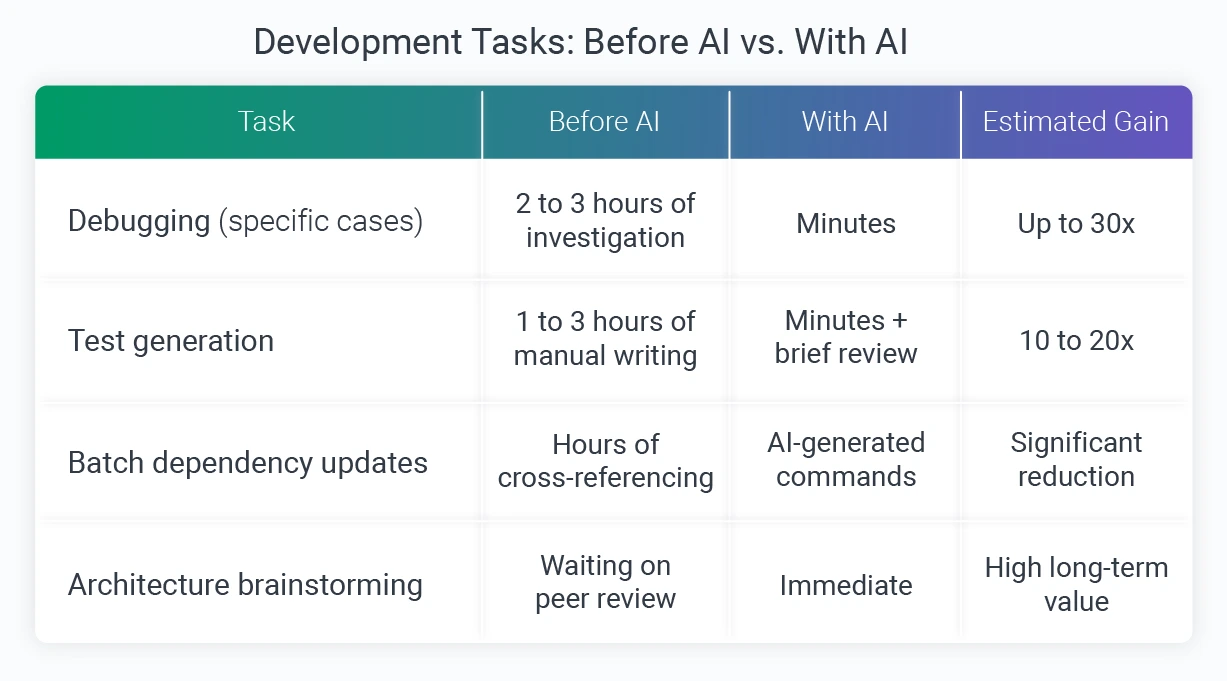
When it came to debugging, the gains were the most dramatic. A file-reading method on the client's platform was running far slower than expected, and rather than starting a long manual dig through documentation and forums, the symptoms and method name went into Claude Code. The AI's first hypothesis missed the mark, but after our engineer pushed back, it went deeper, scanning the underlying web server library and surfacing a known critical bug. Two conversational exchanges replaced what could have been hours of investigation.
Test generation told a similar story, though the value showed up differently. Claude Code handled the mechanical writing: assertions, comparison logic, and the boilerplate structure for verifying CRM export files and CSV reports.
With the repetitive work off the plate, the engineer's attention could go toward making sure the tests actually covered meaningful business scenarios rather than just hitting code coverage metrics.
Throughout the engagement, the team tracked usage closely, monitoring lines of accepted AI-generated code against subscription spend to make sure the investment was holding up. At one point, 33,000 lines of accepted code had accumulated at a total subscription cost of $160, a ratio that confirmed AI time was translating to genuine output rather than draining the budget on low-value interactions.
The value was not limited to the Softjourn side of the project. Members of the client's engineering team independently adopted similar AI tooling for repository documentation, using it to produce structured service-level docs across entire codebases automatically, a sign that the productivity gains were visible well beyond our own workflow.

What Still Needs a Human Hand
Running this work honestly meant documenting not just the wins, but the situations where AI added work rather than removing it.
- Code formatting: When asked to format generated code, Claude Code hallucinated, writing complex Python and Bash scripts to execute what should have been a simple text formatting operation. The output was rejected immediately. The same result took 30 seconds with an IDE keyboard shortcut.
- Complex business logic: AI generates code that compiles but occasionally fails tests, or misses edge cases that a developer with full project context would catch. For anything where a missed case carries real consequences, writing it directly is the more reliable path.
- Multi-system context tasks: When a problem requires pulling data from several interconnected services simultaneously, explaining enough context to make the AI useful can take longer than solving the problem directly.
- Catching confident errors: In a separate troubleshooting session on a configuration issue, an AI assistant confidently identified problems that were not actually problems, then suggested configuration settings that did not exist in the official documentation. The output looked completely reasonable on the surface. Developer expertise was what caught it.
That last point is worth emphasizing. AI output can be structured, confident, and wrong in ways that only someone with genuine knowledge will recognize, which is exactly why the review layer matters as much as the tooling itself.
"It's like having a developer who knows every technology but doesn't know your specific project. You take what's useful and apply your own judgement." — Orest Guziy, Senior Full-Stack Developer, Softjourn
What We Learned
A few principles held consistently across everything tested:
- Know your ROI boundaries. The tasks where AI delivers the highest return tend to be well-defined and repeatable: test scaffolding, debugging diagnostics, and dependency updates. The tasks where it costs more than it saves tend to involve either deep project-specific context or simple operations that IDE tools already handle in seconds.
- The conversation is the prompt. Abandoning formalized, page-long prompt structures in favor of plain-language dialogue made the interaction more productive, not less. Treating the AI as a smart colleague who needs to be briefed, rather than a system that needs to be commanded, consistently produced more useful output.
- Treat every output as a pull request. The same review standard that applies to human-written code applies to AI-generated code. That means checking not just whether it compiles, but whether it tests the right things, handles edge cases, and fits the system it is being written for.
- Track what it costs. Monitoring lines of accepted code against subscription spend keeps usage honest. It is easy to overuse AI on low-value tasks if there is no visibility into whether the output is actually worth what it costs.
-1921x1201.webp?v=1780088755137)
Conclusion
The most useful thing this project confirmed is not that AI makes developers faster (though on specific tasks, it does, significantly). It's that the engineers who get the most from it are the ones who treat it as a collaborator with real strengths and real limits, not as an authority to defer to.
For engineering teams working on complex, multi-service platforms, the overhead that AI handles most reliably tends to be exactly where time disappears during active delivery: test scaffolding, debugging diagnostics, dependency updates. Reclaiming that time without cutting corners on review is the practical value of this approach.
If your team is looking to build a disciplined AI development workflow on a real project, we are glad to share what we have learned. Contact Softjourn to start the conversation.