Modernizing Legacy Education Platforms: Migration Strategies That Protect What You've Built
A practical guide to modernizing legacy education and learning management platforms while preserving content, maintaining compliance, and keeping learners online.

Your EdTech platform has been running on the same learning management system for years, maybe even decades. It was custom-built by a team you may no longer have.
The system works, faculty know it, and students tolerate it. But it can't deliver content to mobile devices without a clunky workaround, doesn't support xAPI, takes months to ship a new feature, and the engineering team that actually understands the codebase is shrinking.
None of this is a crisis, exactly, but it's the kind of slow drift that makes every decision more expensive and every opportunity harder to pursue. When a department head asks about adaptive learning tools or a provost wants real-time retention analytics, the answer keeps being "not with this system."
This guide covers how to modernize a legacy education platform without abandoning the content, data, compliance records, and institutional knowledge it has accumulated over years of use.
For organizations building a new EdTech platform from the ground up, Softjourn's Complete Guide to EdTech Software Development is a better starting point.
How to Tell It's Time to Modernize Your Education Platform
Most EdTech organizations don't wake up one morning and decide to modernize. The realization builds gradually, often across several frustrations that start small and compound.
Some of the clearest signals:
- Adding a simple feature takes months: Not because the feature is complex, but because the codebase is tightly coupled, poorly documented, or both. A change in one area causes unexpected breakages in another.
- The tech stack is becoming a hiring problem: If the platform runs on a framework or language that fewer developers specialize in, every departure creates a knowledge gap that's expensive and slow to fill. Teams end up spending more time maintaining the system than improving it.
- Mobile is an afterthought: Learners increasingly expect to access courses, check grades, and complete assessments from their phones. A platform that was designed for desktop browsers in 2012 rarely handles this gracefully without significant rework.
- Content standards have moved on: Platforms built around SCORM 1.2 may not support xAPI, which means newer interactive content formats, mobile learning experiences, and offline tracking are off the table.
- Compliance updates require workarounds, not configuration changes: When a new state student data privacy law passes, or WCAG requirements tighten, the response should be a settings update, not three weeks of custom development.
- Budget pressure is forcing harder questions: With ESSER (Elementary and Secondary School Emergency Relief) funding expiring across the country, districts and institutions are scrutinizing every technology dollar. A 2025 EDUCAUSE QuickPoll found that 42% of IT leaders anticipated budget decreases in the 2025-2026 academic year. When budgets shrink, legacy platforms that consume a disproportionate share of IT spending on maintenance alone become difficult to justify.
- The platform resists connections: Modern EdTech environments need to connect to video conferencing tools, HR systems, identity providers, payment processors, and analytics dashboards. Legacy monoliths that were designed as self-contained systems make these connections difficult or impossible without heavy custom work.

These frustrations add up financially; across industries, organizations spend roughly 70% of their IT budgets maintaining legacy systems rather than building new capabilities. Higher education is no exception: a CDW survey found that 59% of higher ed IT leaders cite limited capacity for storage and management of on-prem systems, and 44% point to high costs as a barrier to upgrading.
Not all of these signs point to the same solution. Some suggest a cloud migration, while others point to a frontend rebuild, a progressive rewrite, or simply a code refactoring effort.
The right response depends on what a technical assessment reveals about the actual state of the system. Before choosing an approach, though, it's worth stepping back to consider what the modernization needs to preserve.
What You're Actually Protecting During Modernization
The natural instinct when discussing modernization is to focus on what you're building toward: better performance, new features, modern architecture. While this is important for education platforms, the more urgent conversation is often about what you can't afford to lose.
- Learner data and progress records: Grade histories, course completion records, certification data, and enrollment histories represent years of accumulated information. Incomplete transfers create operational headaches at best and legal exposure at worst, particularly for platforms that issue credentials or report to regulatory bodies.
- Content libraries: SCORM packages, xAPI activities, video assets, assessment question banks, and custom interactive content represent a significant investment. Many organizations have spent years building these libraries, and they include more than digitized textbook pages. Branching scenarios, simulations, gamified activities, and rubric-based assessments all carry instructional design decisions that can't be easily replicated.
- Compliance audit trails: FERPA and other regulatory frameworks require continuity in how student records are handled. A gap in audit records during a system transition isn't just an inconvenience; it's a compliance risk that can trigger real consequences.
- User trust and adoption: Faculty who are comfortable with the current system will resist change if the transition feels disruptive or poorly managed. This is especially true at universities, where instructor buy-in is hard to earn and easy to lose. Corporate training environments face a parallel challenge: if the L&D team can't get managers and employees on board with a new system, adoption rates suffer regardless of how good the technology is. Involving instructors and trainers early in the modernization process, rather than handing them a new system after the fact, dramatically improves outcomes.
- Institutional knowledge in the codebase: Legacy systems contain business logic, edge-case handling, and workflow decisions that may not be documented anywhere else. A modernization approach that ignores this loses more than code. It loses understanding of why things work the way they do.
Modernization Is Not Digitization
This distinction matters more than it might seem. Many EdTech organizations believe they've modernized when what they've actually done is digitize: moved PDFs to a cloud folder, added a video player to an existing course structure, or ported a paper-based assessment to an online form.
Digitization takes analog content and makes it available in digital format (which is a content project).
Modernization rethinks how the platform is structured, how content is delivered, how data flows, and how the system adapts to new requirements. That's an engineering project.
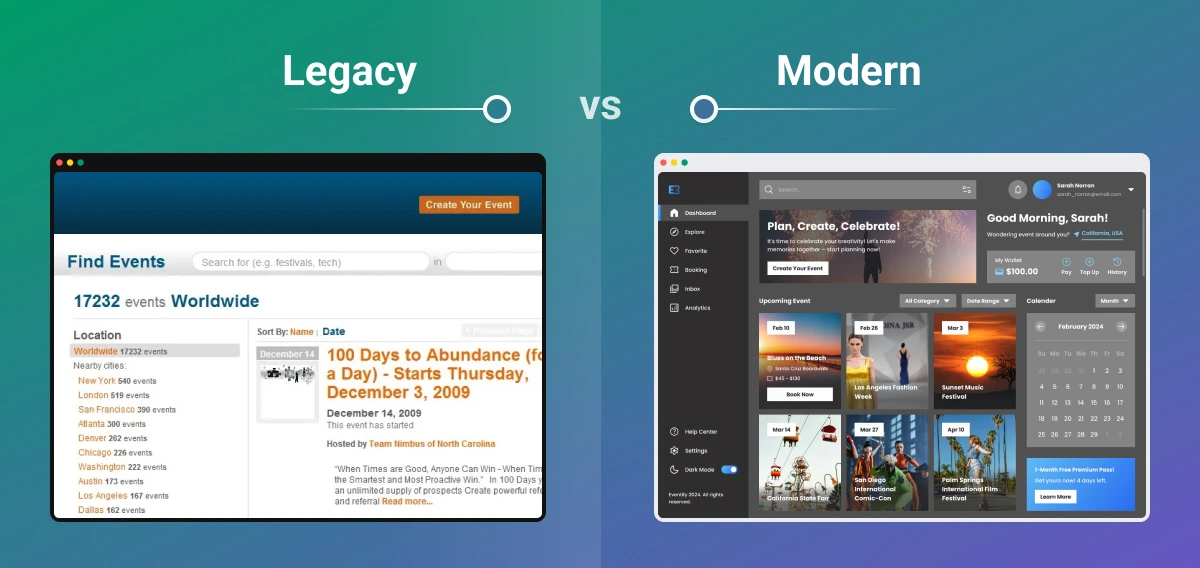
An LMS that was designed to host SCORM packages and track completion percentages isn't suddenly modern because it's hosted on AWS. If the architecture still prevents you from adding adaptive learning paths, supporting offline access, or connecting to external tools without custom middleware, the underlying problem hasn't changed.
Most EdTech organizations need both digitization and modernization, and confusing the two leads to underscoped projects and disappointing results. If a modernization effort is scoped as a content refresh, the budget, timeline, and team composition will all be wrong.
Modernization Approaches: What Works for Education Platforms
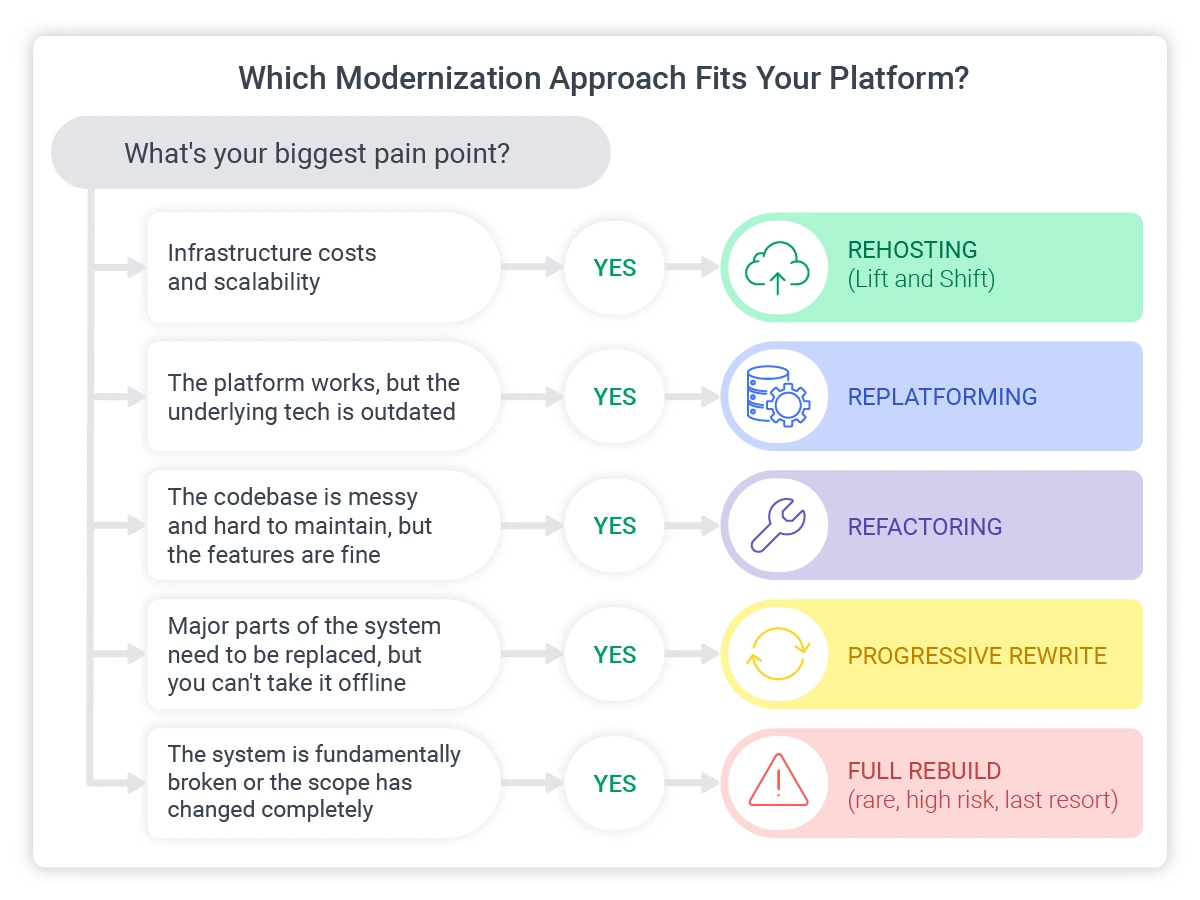
There is no single modernization strategy that works for every EdTech platform. The right approach depends on the system's current state, the organization's goals, and how much disruption the team and user base can absorb.
Softjourn has published extensively on modernization approaches across industries (see Do I Need a Full Code Rewrite When Experiencing Legacy Application Issues?), but the considerations below are specific to education and training platforms.
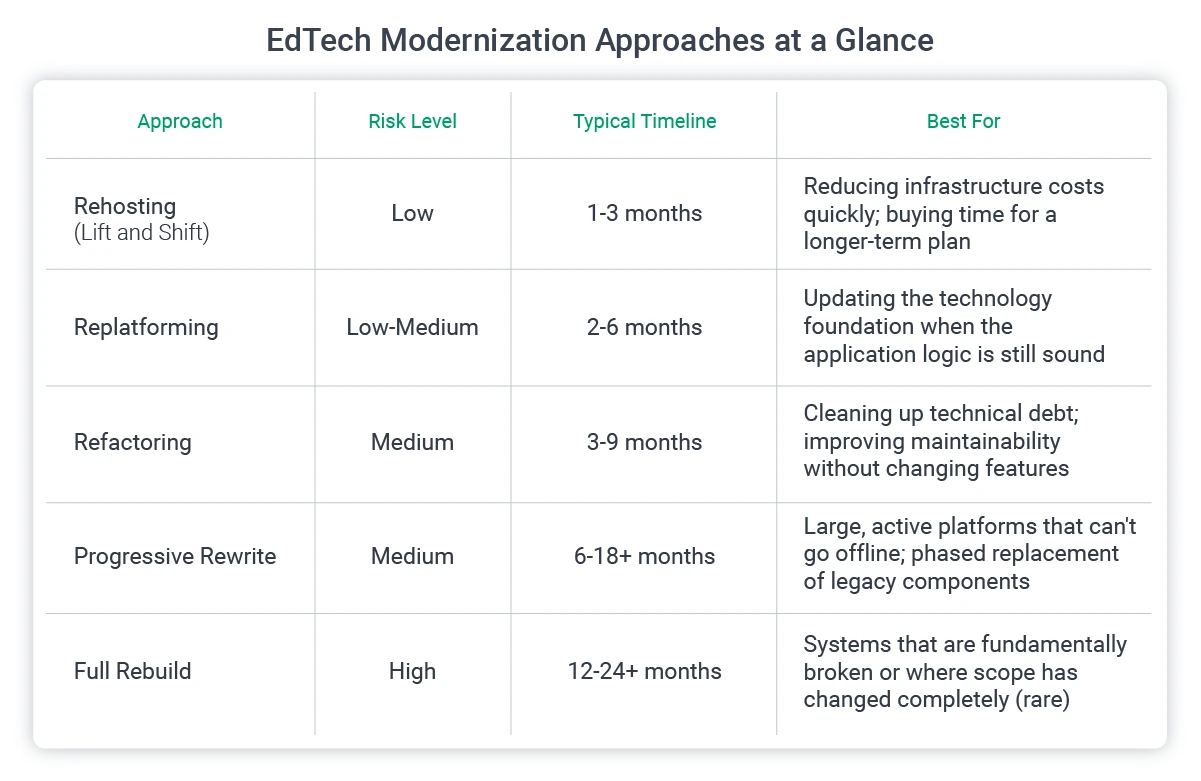
Rehosting (Lift and Shift)
This is where you move the existing application to cloud infrastructure without making significant changes to the code or architecture. Lift and Shift reduces hosting costs, improves scalability, and eliminates aging on-premise hardware.
For EdTech platforms, rehosting is particularly useful when the biggest pain point is infrastructure, and not the application itself. If the platform needs to handle enrollment spikes at the start of each semester or large-scale corporate training rollouts without crashing, cloud scalability solves that problem quickly and at a relatively low risk point.
It doesn't fix architectural limitations, but it does buy time and reduces operational overhead while a longer-term plan takes shape.
Replatforming
If you’d like to update the technology foundation (database engine, middleware, hosting layer) without rewriting the application logic, replatforming is the approach you’d want. This is a middle-ground approach for platforms where the business logic is sound, but the underlying technology has become a bottleneck.
An example of this would be an assessment platform running on a legacy database that can't handle the query volumes required for real-time analytics, might replatform to PostgreSQL or a managed cloud database while keeping the assessment engine largely intact.
Refactoring
Refactoring is where you improve the internal structure of the code without changing what it does externally. This means cleaning up technical debt, improving maintainability, and making the codebase easier for current and future developers to work with.
In EdTech, refactoring is often where SCORM and xAPI compatibility work lives. The content delivery pipeline may need restructuring to support newer content standards without breaking the thousands of existing course packages that instructors and learners depend on. This is painstaking work, but it's far less risky than replacing the entire content delivery layer at once.
Progressive Rewrite
Many platforms with great engineering teams choose progressive rewrites, where you incrementally replace legacy components with modern alternatives while the platform continues operating. This is the approach Softjourn most frequently recommends for large, active platforms across all industries, and it's especially well-suited to EdTech for one simple reason: education platforms often can't go offline for a semester while a new system is built.
A progressive rewrite allows migration work to happen around academic calendars rather than during them. A university might modernize the student-facing portal and assessment engine over the summer, then tackle the administrative backend during a quieter quarter.
Full Rebuild
This is where you rebuild an entirely new system from scratch. Softjourn almost never recommends this unless the legacy system is genuinely beyond saving, because it carries the highest risk, the highest cost, and the longest timeline. Legacy code contains years of tested business logic and edge-case handling that a new system would need to rediscover through its own trial and error.
That said, there are rare situations where a full rebuild is the right call: when the existing system can no longer perform its basic functions, when the codebase is so tangled that even incremental changes are impossible, or when the scope of what the platform needs to do has changed so dramatically that preserving the old system makes no sense.
Even in these cases, a phased or parallel approach (building the new system alongside the old one, rather than replacing it all at once) is typically safer.
Myers-Briggs Utilized a Software Development Partner for Their App Modernization
Myers-Briggs, a longtime Softjourn client, reached a point where their assessment platform had grown into a legacy system. Years of incremental changes had accumulated technical debt, and the architecture was slowing down the team's ability to deliver new features and improve the user experience.
Softjourn worked through a structured modernization process that preserved the existing assessment functionality (the testing logic, scoring mechanisms, and user workflows that Myers-Briggs's customers relied on) while rebuilding the underlying architecture for long-term sustainability. The goal was not to change what the platform did, but to change how it did it, so the team could move faster going forward.
The partnership has continued for over a decade, with Softjourn supporting multiple internal shifts and evolving project priorities at Myers-Briggs. For EdTech organizations running assessment or testing platforms, this is a useful reference point: modernization doesn't mean disrupting the user experience. It means replacing the infrastructure underneath while keeping the surface stable.
When Modernization Involves Migration
Not every modernization project involves a major migration. Some are refactoring efforts or progressive rewrites that happen in place. But when a modernization effort does require moving data, content, or infrastructure from one environment to another, whether that means shifting to the cloud, switching databases, or replacing the content delivery layer entirely, the stakes rise significantly.
Content, compliance records, learner data, and user access all need to survive the transition intact. The sections below cover the specific migration challenges that education platforms face.
Compliance: Modernizing Without Creating Gaps
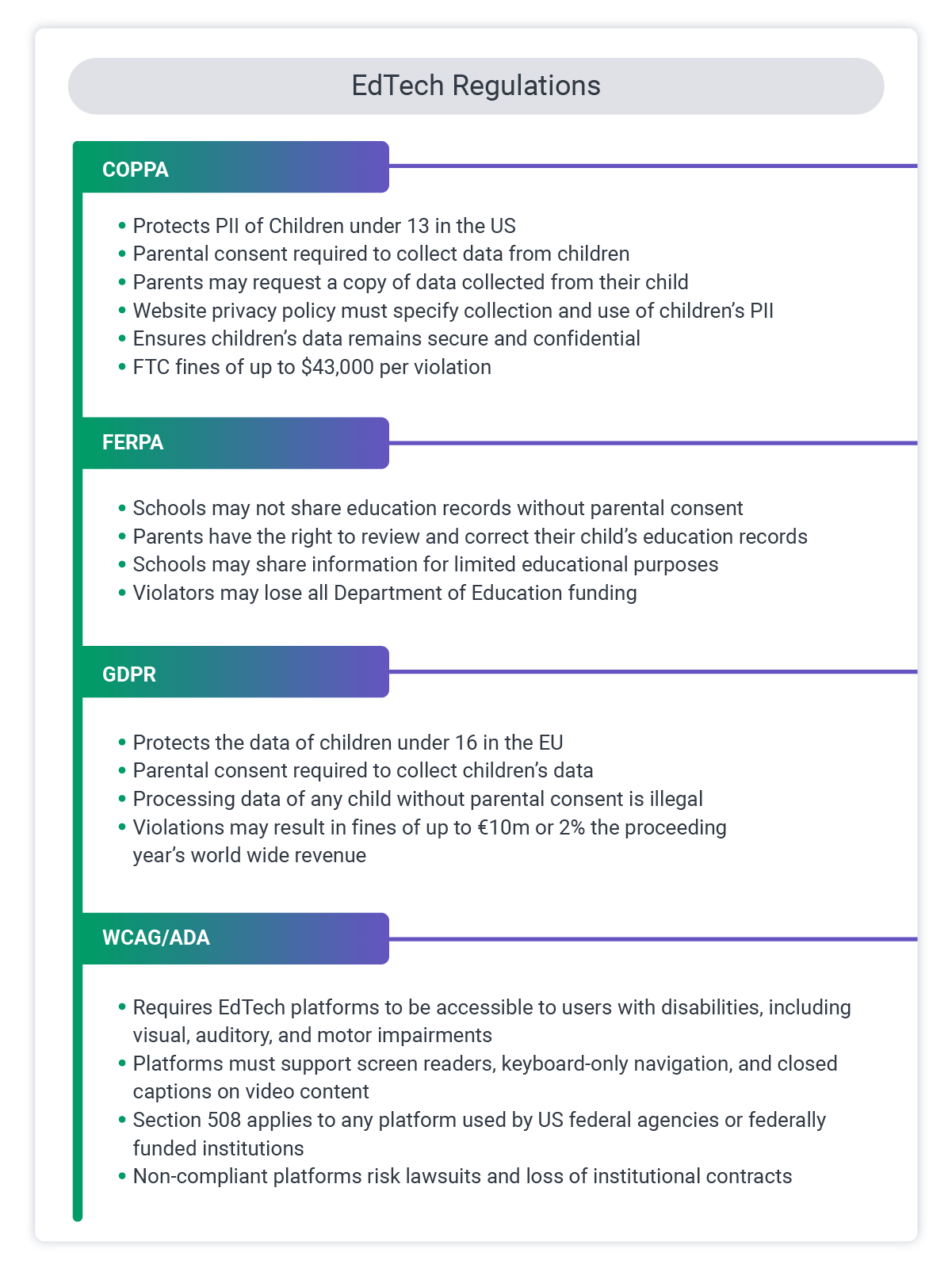
Education platforms manage some of the most heavily regulated categories of personal data. Student records, minor children's information, assessment results, and – in enterprise training settings – performance data tied to employment. The transition period during a migration is exactly where compliance failures tend to happen.
FERPA requires unbroken audit trails for student education records. Data in transit during migration must be encrypted, and access controls need to carry over cleanly to the new environment. Institutions that receive federal funding cannot afford gaps in their record-keeping chain.
COPPA applies to platforms serving children under 13. Parental consent records and data minimization requirements must survive the migration completely. If a platform collected verifiable parental consent under the old system, that consent record needs to exist in the new one.
GDPR affects any platform with users in the European Union, regardless of where the platform is based. Data subject rights (the right to deletion, data portability, and withdrawal of consent) need to function in the new system from launch.
State-level student privacy laws create additional complexity. Since 2014, state policymakers have passed nearly 150 student privacy laws across 47 states and Washington, DC (Student Privacy Compass). California's SOPIPA, New York's Education Law 2-d, and Illinois's SOPPA are among the most cited, but the list is long and growing. Platforms serving schools in multiple states need to track and comply with a patchwork of requirements, and each one may handle data retention, parental access, and vendor agreements differently.
WCAG and ADA accessibility requirements must be preserved or improved during modernization. If the legacy system had accommodations in place (extended time settings, screen reader support, keyboard navigation), those features need to exist in the new system.
Cybersecurity during the transition itself deserves specific attention. Student data breaches can compromise a child's credit and identity long before they reach adulthood, and the period when data is being moved between systems is a particularly vulnerable window. Encryption in transit, access auditing, and careful credential management during migration aren't optional steps.
The practical advice here is straightforward: build a compliance checklist specific to your regulatory environment before modernization begins, not during. We also recommend that you map every regulatory obligation to a specific system capability, verify that the new environment satisfies each one, and test compliance in staging before the production go-live.
Future-Proofing UPC's Open Banking Platform: A Strategic AWS Migration
Softjourn has deep experience helping platforms with strict compliance requirements navigate migrations without creating gaps. In one engagement, Softjourn worked with UPC, a financial processing center, to migrate their Open Banking platform to AWS while maintaining PCI DSS compliance throughout. The migration used Terraform and serverless architecture, with environment isolation and continuous compliance verification built into every phase. We apply the same technical discipline applies to education platforms where FERPA, COPPA, or state-level student privacy laws require unbroken compliance throughout a system transition.
Content Migration: The Part Everyone Underestimates
Content libraries represent years of investment, and migrating them cleanly is one of the most technically demanding parts of EdTech modernization. The challenge isn't just moving files from one location to another, but ensuring that every content package, assessment, and interactive element works correctly in its new environment.
- SCORM and xAPI compatibility is the first area where problems surface. Older SCORM 1.2 packages may behave differently in modern runtime environments, and content that tracked correctly in the legacy system may report completion or scoring data inconsistently in a new LMS. Each package needs to be validated after migration, and for organizations with hundreds or thousands of course packages, that's a significant testing effort.
- Video content adds another layer of complexity. If video is self-hosted on the platform rather than delivered through a third-party CDN like Vimeo or Mux, migration planning needs to account for storage volumes, encoding formats, adaptive bitrate configurations, and streaming infrastructure. A video that played smoothly from an on-premise server may buffer or fail entirely if the new cloud environment isn't configured to handle the delivery requirements.
- Assessment question banks with complex grading logic, question randomization, rubric-based evaluation, and adaptive difficulty settings need thorough testing after migration. A question bank that served 50,000 learners reliably in the old system cannot be assumed to work identically in a new one without verification.
- Interactive and custom content is often the most fragile. Drag-and-drop activities, simulations, branching scenarios, and gamified elements may depend on specific frontend frameworks, player technologies, or JavaScript libraries that change during modernization. If the frontend stack changes, these content types may break in ways that aren't immediately visible without learner-facing testing.
- Content versioning decisions carry both technical and business weight. If the legacy platform maintained version histories of course content, the migration team needs to decide whether to bring all versions forward or only the current ones. Archiving older versions reduces migration complexity but may create problems for organizations that need to demonstrate what was taught at a specific point in time (a common requirement in compliance-driven training environments).
This is an area where a content audit before migration pays for itself quickly. Knowing exactly what you have, what formats it's in, and what dependencies it carries prevents the most common surprise: discovering mid-migration that 200 course packages don't work in the new system.
Timing and Sequencing: Working Around the Academic Calendar
EdTech platforms operate on rigid schedules that shape when major technical work can happen. A university LMS going down during midterms, a corporate training platform unavailable during compliance certification season, or a K-12 assessment tool offline during state testing windows are all scenarios that would cause immediate, visible damage to users and institutional credibility.
Planning major migration phases for low-traffic periods is not just a best practice; it's a constraint that shapes the entire project timeline. For academic institutions, summer breaks and intersession periods are the natural windows. For corporate training platforms, the timing depends on enrollment cycles and mandatory training schedules.

Parallel environments and/or progressive migrations are essential for high-stakes transitions. Running the new system alongside the old one, loaded with real content and tested with real user workflows, provides a safety net that cut-and-hope migrations do not. If something breaks in the new environment, the old system is still there.
Communication deserves as much planning as the technical work. Teachers, instructors, and administrators who feel blindsided by a platform change will push back regardless of how good the new system is. We recommend early, clear communication about what's changing, when, and why, which reduces resistance. To build maximum buy-in and make adoption smoother, you can include end users in testing phases, rather than just telling them about the results.
For large platforms, a phased rollout is almost always smarter than a single cutover. Migrate one department, school, or training program first, learn from the experience, and then expand.
How to Start: The First 30 Days of a Modernization Project
If your organization has decided it's time to modernize but isn't sure where to begin, these first steps turn a vague intention into a concrete plan.
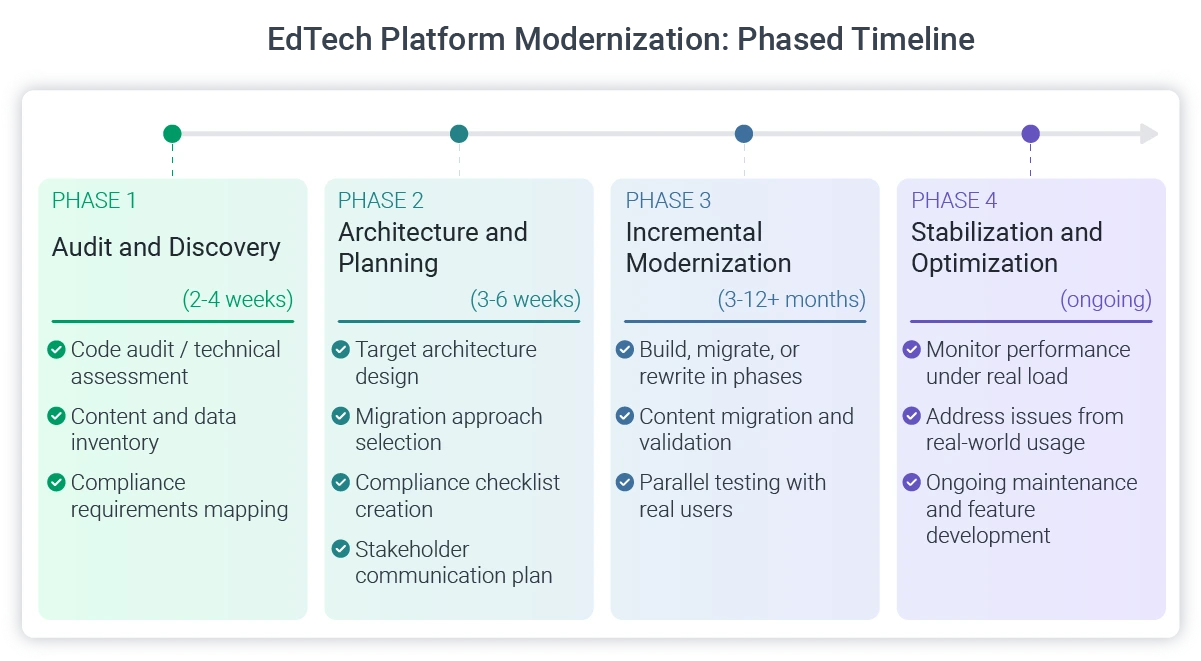
- Run a code audit or technical assessment: Understand what you actually have before deciding what to change. A thorough audit surfaces undocumented dependencies, security vulnerabilities, architectural constraints, and areas of technical debt that aren't visible from the outside. This step prevents the most expensive mistakes: committing to an approach that doesn't fit the system's actual condition.
- Map your content and data: Inventory all content types, data stores, and system connections. Identify what needs to migrate, what should be archived, and what can be retired. This is also where redundant tools and unused licenses tend to surface, platforms that are still being paid for but barely used by instructors or learners.
- Define your compliance requirements. List every regulatory obligation the platform must meet and document how the current system satisfies each one. This document becomes your modernization compliance checklist, the reference that ensures nothing falls through the cracks during the transition.
- Identify quick wins. Look for high-impact, low-risk improvements that can happen early. A cloud hosting migration, a frontend refresh, or a database optimization may not be the full modernization, but they deliver visible results that build stakeholder confidence and justify continued investment.
- Choose your modernization approach. Based on the audit findings, content inventory, and compliance requirements, decide whether you're rehosting, refactoring, progressively rewriting, or using some combination. The approach should match the system's actual condition, not a predetermined preference.
- Pick the right partner (or build the right team). EdTech modernization requires experience with both legacy systems and modern architectures, combined with familiarity with education-specific constraints like content standards, regulatory requirements, and academic calendar timing. This is not a generic web development project, and treating it like one is a common source of delays and cost overruns.
Case Study Snapshot: Girls in Tech Assessment Platform
Girls in Tech, a nonprofit with over 100,000 members across 38 countries, came to Softjourn after a previous development attempt fell short. Rather than starting completely over, Softjourn audited the existing code, identified what could be salvaged, and built out a recruitment and assessment platform properly. The work started with a thorough product definition, including research into best-practice assessment implementations, before any development began. The resulting platform launched with skills-based assessments connected to candidate profiles and a matchmaking model designed to reduce mismatched hires.
When Modernization Goes Wrong: Common Mistakes in EdTech
Most modernization failures aren't caused by picking the wrong technology. The problems tend to be more human and more preventable than that.

Migrating during peak usage periods – It seems obvious, but it happens more often than it should. A platform transition during the first weeks of a semester or during mandatory compliance training season creates exactly the kind of disruption that turns users against the new system before they've even used it properly.
Treating content migration as an afterthought – The engineering team rebuilds the architecture, launches the new system, and then discovers that hundreds of SCORM packages don't render correctly, video content won't stream, or assessment question banks lost their grading logic. Content migration needs to be planned and tested with the same rigor as the platform itself.
Failing to preserve compliance audit trails – If there's a gap in your FERPA records because data was in transit during the migration and nobody maintained the audit chain, that gap doesn't disappear once the new system is running. It becomes a liability.
Skipping parallel testing with real users – Internal QA catches technical bugs. But instructors, administrators, and learners interact with the system in ways that QA teams don't anticipate. Running the new system alongside the old one with actual users for a meaningful testing period is the most reliable way to catch problems before they affect everyone.
Underestimating the institutional knowledge buried in legacy code – The reason a particular workflow behaves a certain way may not be documented anywhere except the code itself. A modernization approach that doesn't account for this, either through careful code review or by involving the people who built the original system, risks reproducing old problems or creating new ones.
Confusing digitization with modernization and underscoping the project – If the scope is set for a content refresh but the real need is an architecture overhaul, the project will either run over budget and timeline, or it will deliver a result that doesn't solve the underlying problem.
Not involving instructors and trainers in the process – Teachers and corporate trainers who are handed a new system without being consulted during development tend to resist it, find workarounds, or revert to older methods. Involving them early, through advisory groups, testing phases, or feedback cycles, requires time up front but saves far more later.
What a Modern Platform Makes Possible
Modernization solves immediate problems: performance, maintainability, compliance, developer hiring. But it also determines whether your platform can say "yes" to the next generation of EdTech capabilities or whether each new opportunity requires another six-month workaround project.
Accessibility and Inclusive Design
A modern, modular frontend makes it significantly easier to add screen reader support, keyboard navigation, closed captioning, high-contrast modes, extended time accommodations, and multilingual interfaces. On a legacy monolith, each of these is a custom project with unpredictable side effects. On a well-architected modern platform, many are configuration changes or standard component additions.
This matters increasingly for procurement: districts and institutions are using accessibility compliance as a filter when evaluating platforms, and tools that can't demonstrate WCAG conformance are being excluded from consideration before the conversation even starts.
AI-Powered Tools
Adaptive learning paths, AI-assisted grading for open-ended responses, early warning systems that identify at-risk learners from engagement patterns, and AI-powered content authoring tools all require clean data pipelines and flexible APIs. A legacy system with siloed databases and a rigid architecture can't support these tools in any meaningful way. A modernized platform can connect to them as they mature, whether that means building AI features in-house or connecting to third-party services, without requiring a separate infrastructure project each time.
AR/VR and Immersive Learning
When headset costs continue to come down, and immersive content becomes more widely available, the platforms that can deliver it will be the ones with modern content delivery layers, flexible frontend frameworks, and cloud infrastructure capable of handling heavier processing requirements. Building immersive learning features on top of a 12-year-old monolithic codebase isn't realistic, and organizations that want to move into VR simulation for medical training, technical skills development, or vocational education will need a platform that was architected for that possibility.
Modernization isn't just about fixing what's broken today. It's about building a platform that can absorb what comes next without requiring another major overhaul in three years.
Final Word
The platform your organization built years ago served its purpose, and it may still be serving it today. Modernization isn't about abandoning what works. It's about making sure the platform can keep working as learner expectations change, compliance requirements tighten, and the technical landscape continues to shift.
For organizations building an EdTech platform from the ground up, Softjourn's Complete Guide to EdTech Software Development covers the full landscape of platform types, technology decisions, and development processes.
If you're running a legacy education platform and want an honest assessment of where to start, whether that's a code audit to understand the system's actual condition, a phased migration plan, or a conversation about what modernization would realistically look like for your situation, contact Softjourn to start the conversation.